
Key Takeaways (Quick Summary)
If you want to rank higher for “near me” searches, focus on three things:
a fully optimized Google Business Profile, strong local relevance on your website, and consistent off-page local authority signals. Google doesn’t rank businesses just because they use the phrase “near me” — it ranks them based on relevance, proximity, and prominence.
Explore similar post covering all key “near me” ranking factors on Google Maps
Want more calls, directions, and walk-in customers without increasing ad spend?
Ranking in the Google Map Pack for “near me” searches is one of the most powerful local SEO wins for any local business. When done right, it puts your business directly in front of high-intent users who are ready to take action.
This guide breaks down exactly how local businesses rank for “near me” keywords, using a practical, SOP-style approach you can plug straight into your local SEO workflow.
Ranking for “near me” searches requires more than keyword optimization. Our Local Search Engine Optimization Services focus on improving both proximity relevance and local authority signals.
How “Near Me” Searches Actually Work
One of the biggest misconceptions in local SEO is treating “near me” like a literal keyword.
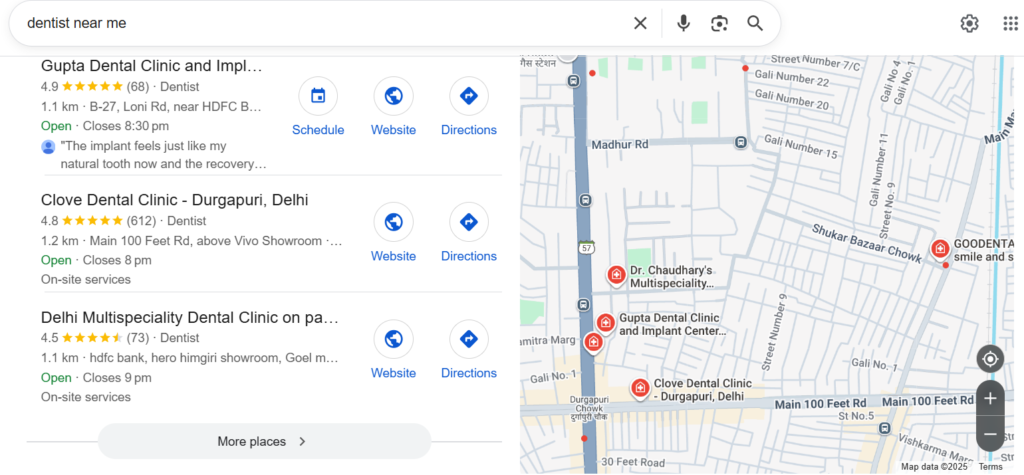
In reality, Google interprets “near me” as local intent combined with the user’s real-time location. This means your business doesn’t need to stuff “near me” everywhere. Instead, Google decides which businesses are:
- Most relevant to the query
- Closest to the searcher
- Most prominent and trusted
These three pillars — relevance, distance, and prominence — determine who appears in the Map Pack.
Step 1: Get Your Google Business Profile Fundamentals Right
Your Google Business Profile (GBP) is the foundation of Google Maps ranking for near me keywords.

Start by claiming and verifying your listing. Complete every field accurately, including business name, address, phone number, website, hours, services, and attributes. Use your real business name only — adding modifiers like “best” or “near me” can trigger suspensions.
Choosing the right categories is critical. Your primary category should describe your core service precisely, while secondary categories should support additional services you genuinely offer. Categories directly influence which “near me” searches you can appear for.
Your business description and services should focus on benefits and local relevance, not keyword repetition. Phrases like “emergency plumber in Andheri, Mumbai” signal relevance far better than repeating “near me.”
Step 2: Align Your Website With Local Search Intent
Even with a strong GBP, your website plays a major role in near me search optimization.
Create dedicated location and service pages instead of forcing everything onto one generic page. A page like “Root Canal Treatment in Pune” or “24 Hour Electrician in Thane” helps Google clearly understand your service-area relevance.
On-page optimization should naturally include city or area names in title tags, headings, and key sections. Adding your Name, Address, Phone Number (NAP) details in the footer and contact page — along with an embedded Google Map — strengthens location trust.
Implement LocalBusiness schema with consistent name, address, phone, geo-coordinates, and profile links. Schema alignment between your website and GBP reinforces entity accuracy and trust.
Step 3: Understand Proximity and Coverage Limits
Proximity is one of the strongest near me keyword ranking factors.
Businesses located closer to dense commercial areas usually have an advantage. Even service-area businesses should maintain a real, eligible address to compete effectively.
It’s also important to set realistic expectations. Ranking across an entire metro area is unlikely if competitors are closer to the searcher. Instead, expand visibility by building geo-specific pages and topical authority for individual neighborhoods.
Step 4: Build Strong Review and User-Generated Signals
Reviews are not just social proof — they’re a major local ranking and conversion factor.
Create a simple system to request reviews from every satisfied customer using QR codes or short links. Consistent review velocity matters more than occasional spikes.
Encourage customers to naturally mention the service and area in their feedback, such as “AC repair in Whitefield.” Respond to every review promptly, using natural language that reinforces local relevance.
Photos and videos uploaded by customers add another layer of trust and local context, strengthening your overall profile authority.
Step 5: Keep Your Google Business Profile Active
An active GBP sends strong engagement signals to Google.
Posting weekly updates about offers, FAQs, or seasonal services keeps your profile fresh. Use city and service terms naturally without spammy phrasing.
Proactively add and answer common questions in the Q&A section. This reduces friction for potential customers and improves keyword relevance.
Enable messaging and booking features wherever possible. Faster responses and easier conversions directly support better engagement metrics.
Step 6: Strengthen Off-Page Local Authority
Off-page signals help Google validate your business beyond your own properties.
Ensure consistent NAP details across major directories and platforms. Conflicting addresses or duplicate listings can weaken your local trust signals.
Local backlinks are especially powerful. Links from local news sites, bloggers, chambers of commerce, NGOs, and neighborhood organizations increase prominence.
Publishing geo-relevant content — such as neighborhood guides, case studies, or FAQs — further reinforces your service area expertise.
Step 7: Optimize for User Behavior and Experience
Ranking is only half the battle — engagement determines whether you keep that visibility.
Your Map Pack listing should encourage clicks with strong visuals, accurate attributes, and high ratings. Photos and reviews heavily influence click-through rates.
Once users land on your website, ensure fast loading, mobile-friendly design, and clear local CTAs. Click-to-call buttons, WhatsApp links, and trust indicators above the fold reduce bounce-backs to Google.
Monitor behavior metrics like calls, direction requests, and website clicks using GBP Insights to understand what’s working.
Step 8: Track, Improve, and Scale Your “Near Me” Strategy
Use grid-based local rank tracking to see how your visibility changes across neighborhoods.
Focus on real business outcomes — calls, messages, and visits — rather than rankings alone.
Refine keyword targeting using Search Console, GBP Insights, and Google’s own autocomplete suggestions. Prioritize terms with clear commercial intent.
For multi-location businesses, repeat the same structure: unique GBP profiles, localized landing pages, and area-specific content for each branch.
Final Checklist for Ranking in “Near Me” Searches
A complete and accurate Google Business Profile, locally optimized website pages with schema, steady reviews mentioning services and areas, active GBP engagement, consistent citations, and growing local authority links — this combination consistently drives Google Map Pack visibility.
Conclusion: Turning “Near Me” Visibility Into Real Customers
Ranking for “near me” keywords isn’t about tricks or keyword stuffing. It’s about aligning your location, relevance, authority, and user experience with how Google understands local intent.
When your Google Business Profile, website, and off-page signals work together, “near me” searches stop being unpredictable — they become a reliable source of calls, directions, and customers.
If you want a custom “near me” SEO strategy tailored to your business location, competition, and services, start by auditing your Google Business Profile and local pages today. Small improvements compound fast in local search — and the Map Pack rewards consistency.