

Arun Kumar
Arun Kumar is an SEO specialist and founder of Digi Arun with 6+ years of experience in technical SEO, local SEO, content optimization, and search strategy. He helps businesses improve organic visibility through data-driven SEO strategies and regularly works with Google Search Console, Google Analytics, Ahrefs, Semrush, and Screaming Frog.
Published:
Last Updated:
Last Reviewed: August 31, 2026
If you’re looking for affordable web hosting for a WordPress website, blog, portfolio, or small business website, Hostinger is probably one of the names you’ll come across.
But a low introductory price doesn’t automatically make a hosting provider the right choice.
The more important questions are:
- What do you actually get for the price?
- How much will hosting cost when the introductory period ends?
- Which Hostinger plan should you choose?
- Is Hostinger good for WordPress?
- How does its infrastructure affect website performance?
- Is it suitable for a small business or WooCommerce store?
- And, from an SEO perspective, does Hostinger actually help your website?
That’s what this review is designed to answer.
I’m looking at Hostinger from an SEO professional’s perspective, with particular attention to website performance, WordPress, technical infrastructure, small-business websites, scalability, and long-term value.
Editor’s note: Pricing, promotions, plan limits, and features can change. The pricing information in this review was checked against Hostinger’s India website on September 03, 2026.
Quick Verdict
Hostinger is a strong option for many beginners, bloggers, freelancers, consultants, and small businesses that want affordable hosting with WordPress support and an easy-to-manage hosting environment.
However, I wouldn’t recommend choosing Hostinger based solely on its promotional price.
Your website’s resource requirements, expected traffic, backup needs, performance requirements, and long-term hosting cost matter much more.
Hostinger is a good fit for:
- Beginners launching their first website
- Bloggers and content websites
- Freelancers and consultants
- Small business websites
- Portfolio websites
- Lead-generation websites
- Small WordPress websites
- Smaller WooCommerce stores
Hostinger may not be the right choice if you need:
- Highly specialized server infrastructure
- Extensive server customization
- Enterprise-level infrastructure
- Consistently high resource capacity
- A specialized environment for a demanding application
What I like most
Hostinger combines a broad range of hosting features with relatively accessible pricing. Its current hosting plans include features such as SSL, CDN, backups, WordPress support, LiteSpeed-based infrastructure, and hPanel management.
What I would watch carefully
Renewal pricing.
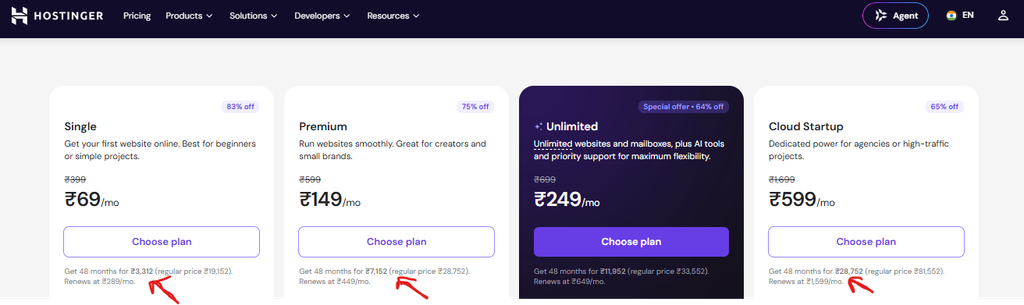
The current Hostinger India pricing page displays promotional prices based on a 48-month term, but the renewal prices are considerably higher. For example, the current Single plan is displayed at ₹69/month initially and renews at ₹289/month. Premium is displayed at ₹149/month and renews at ₹449/month.
So the better question isn’t:
“How cheap is Hostinger?”
It’s:
“What will Hostinger cost me over the life of my website, and does the selected plan provide enough resources?”
My recommendation
If you have a normal WordPress, blog, portfolio, consulting, or small-business website, Hostinger is worth considering.
If you’re running a demanding ecommerce store, high-traffic application, or specialized business platform, compare higher-resource cloud, VPS, managed WordPress, or specialized hosting options before making your decision.
Hostinger at a Glance
Here is the current snapshot of Hostinger’s India web-hosting plans.
| Feature | Single | Premium | Unlimited | Cloud Startup |
|---|---|---|---|---|
| Promotional price* | ₹69/mo | ₹149/mo | ₹249/mo | ₹599/mo |
| Renewal price | ₹289/mo | ₹449/mo | ₹649/mo | ₹1,599/mo |
| Websites | 1 | 3 | Unlimited | Unlimited |
| Storage | 10 GB SSD | 20 GB SSD | 50 GB NVMe | 100 GB NVMe |
| Backups | Weekly | Weekly | Daily | Daily + on-demand |
| CDN | Yes | Yes | Yes | Yes |
| WordPress | Yes | Yes | Yes | Yes |
| Free domain | Yes | 1 year | 1 year | 1 year |
| Support | 24/7 | 24/7 | 24/7 | 24/7 |
*Promotional pricing shown by Hostinger for a 48-month term at the time of this review. Prices and features can change.
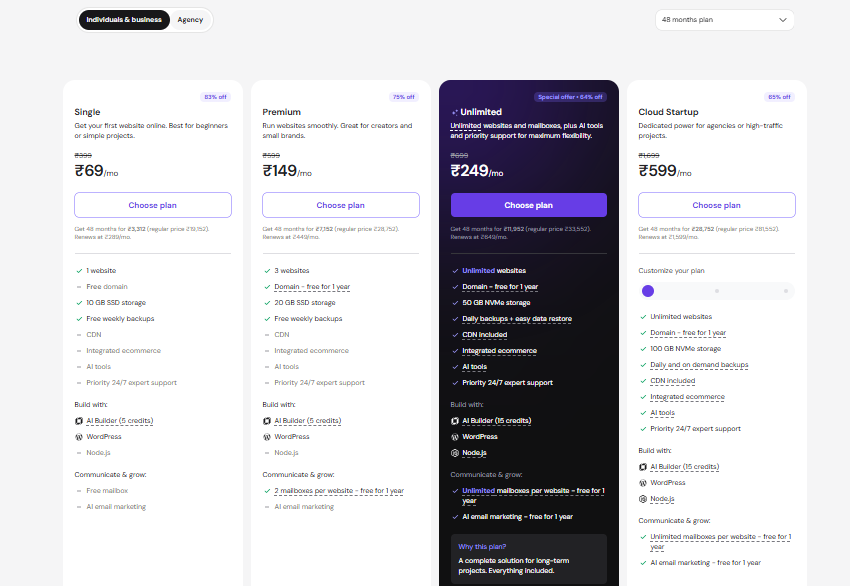
Related Guide: Hostinger Premium vs Business
What Is Hostinger?
Hostinger is a web hosting provider offering several types of hosting and website-building services.
For most website owners, the most relevant options include managed web hosting, WordPress hosting, cloud hosting, and VPS hosting.
The company also provides tools for domains, website building, email, AI-assisted website creation, website migration, security, caching, and performance management.
For this review, however, the important question isn’t simply whether Hostinger offers a lot of features.
It’s whether those features are actually useful for your website.
A five-page local business website doesn’t need the same infrastructure as a high-traffic ecommerce store.
That’s why I recommend looking at Hostinger based on use case rather than feature count.
Hostinger Plans and Pricing
Pricing is one of Hostinger’s biggest selling points, but it is also an area where buyers need to pay close attention.
At the time of writing, Hostinger’s India website displays the following prices for its 48-month web-hosting plans:
| Plan | Current promotional price | Renewal price | Best suited for |
|---|---|---|---|
| Single | ₹69/mo | ₹289/mo | One simple website |
| Premium | ₹149/mo | ₹449/mo | Small brands and multiple websites |
| Unlimited | ₹249/mo | ₹649/mo | Multiple websites and growing projects |
| Cloud Startup | ₹599/mo | ₹1,599/mo | Higher-resource or high-traffic projects |
The most important thing to notice is the difference between introductory pricing and renewal pricing.
For example:
- Single: ₹69/month initially → ₹289/month on renewal
- Premium: ₹149/month initially → ₹449/month on renewal
- Unlimited: ₹249/month initially → ₹649/month on renewal
- Cloud Startup: ₹599/month initially → ₹1,599/month on renewal
This doesn’t necessarily make Hostinger expensive.
It simply means you should calculate the long-term cost rather than making your decision based on the promotional number alone.
Single
The Single plan is designed for one website and currently includes 10 GB SSD storage and weekly backups.
It’s suitable for:
- Personal websites
- Small blogs
- Portfolios
- Simple WordPress websites
- Basic business websites
If you’re launching a simple website with modest requirements, there’s little reason to pay for substantially more infrastructure than you need.
Premium
Premium currently supports up to three websites and includes 20 GB SSD storage and weekly backups.
This makes it more interesting for:
- Freelancers
- Consultants
- Small businesses
- Website owners managing multiple projects
- Users expecting their website needs to grow
For many small-business owners, this is likely to be a more practical starting point than selecting the cheapest plan simply because it has the lowest promotional price.
Unlimited
The current Unlimited plan supports unlimited websites and provides 50 GB NVMe storage with daily backups.
This is useful if you manage multiple smaller websites.
However, don’t interpret “unlimited websites” as unlimited server resources.
Your websites still operate within the technical limits of the hosting environment.
Cloud Startup
Cloud Startup is the more powerful option in this current lineup.
Hostinger lists 100 GB NVMe storage, unlimited websites, and daily plus on-demand backups for the current Cloud Startup plan.
It’s more appropriate when your requirements have moved beyond a basic shared-style hosting environment.
But I wouldn’t recommend upgrading to cloud hosting simply because it sounds more powerful.
Your actual workload should determine the upgrade.
Which Hostinger Plan Should You Choose?
Here’s my simple decision framework.
Choose Single if:
- You have one website.
- Traffic is relatively low.
- You’re launching a personal website or blog.
- Your WordPress website is relatively simple.
- You want the lowest entry cost.
Choose Premium if:
- You need several websites.
- You’re a freelancer or consultant.
- You manage small business websites.
- You need more storage.
- You expect moderate growth.
Choose Unlimited if:
- You manage multiple websites.
- You need more storage.
- Daily backups are important.
- You’re managing several smaller business or content websites.
Consider Cloud Startup if:
- Your website needs more resources.
- Traffic is increasing significantly.
- You’re outgrowing your current hosting.
- You need a stronger environment for demanding websites.
Don’t choose a plan based only on storage.
Hostinger itself recommends considering factors such as NVMe storage, LiteSpeed, caching, CPU/RAM allocation, PHP workers, and server location when evaluating hosting.
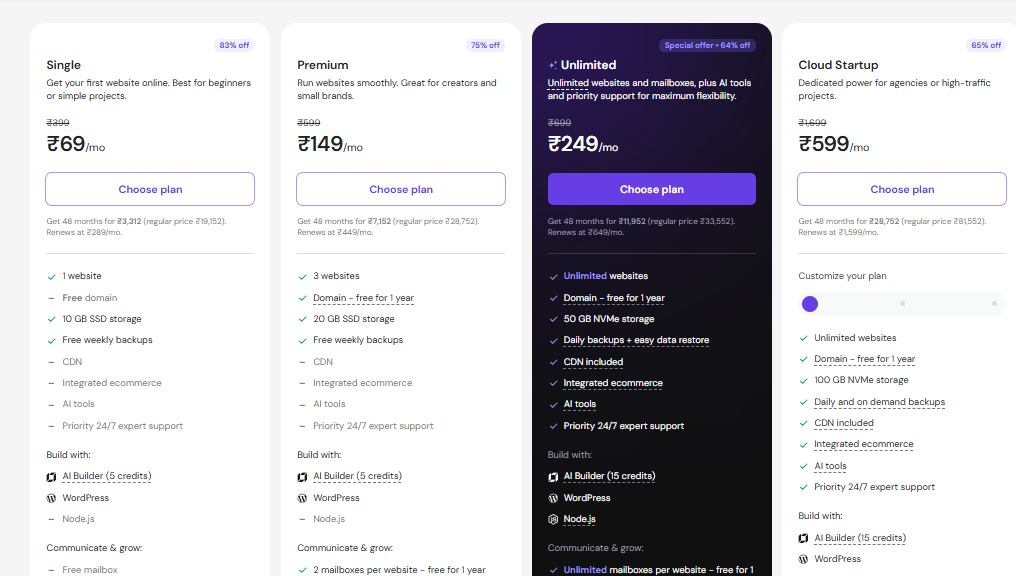
Compare Hostinger plans and choose the right one for your website
Hostinger Performance: Is It Actually Fast?
Performance is one of the areas where hosting reviews often become misleading.
A hosting provider can use modern infrastructure and still deliver poor results for a poorly optimized website.
Your actual website performance depends on:
- Server infrastructure
- Server location
- WordPress configuration
- Theme
- Plugins
- Images
- JavaScript
- CSS
- Caching
- CDN
- Database queries
- Traffic
- Third-party scripts
Hostinger currently uses LiteSpeed web servers and NVMe storage on relevant plans and promotes built-in CDN and caching features.
Its own technology page also reports an average server response-time range of 11–274 ms and states that it aims for 99.9% uptime. Those are Hostinger’s own infrastructure claims, not independent DigiArun test results.
That’s an important distinction.
I would not take a provider’s average response-time figure and present it as the expected TTFB of your website.
Does Hostinger Improve Google Rankings?
No hosting provider can guarantee that.
Hosting can contribute to the technical environment in which your website operates.
For example:
Hosting
→ server response
→ content delivery
→ caching/CDN
→ page performance
→ user experience
→ potential contribution to page experience
But SEO involves much more than hosting.
A website can have excellent hosting and still perform poorly in Google because of:
- Weak content
- Poor search intent matching
- Indexing problems
- Poor internal linking
- Technical SEO problems
- Weak backlinks
- Poor information architecture
- Duplicate content
- Poor user experience
Google’s documentation makes clear that Core Web Vitals are part of its page-experience considerations, but good Core Web Vitals alone don’t guarantee strong rankings.
So I would never tell a client:
“Buy Hostinger to improve your rankings.”
A more accurate statement is:
Good hosting can provide a solid technical foundation, but it is only one component of SEO.
DigiArun’s Hostinger Performance Test
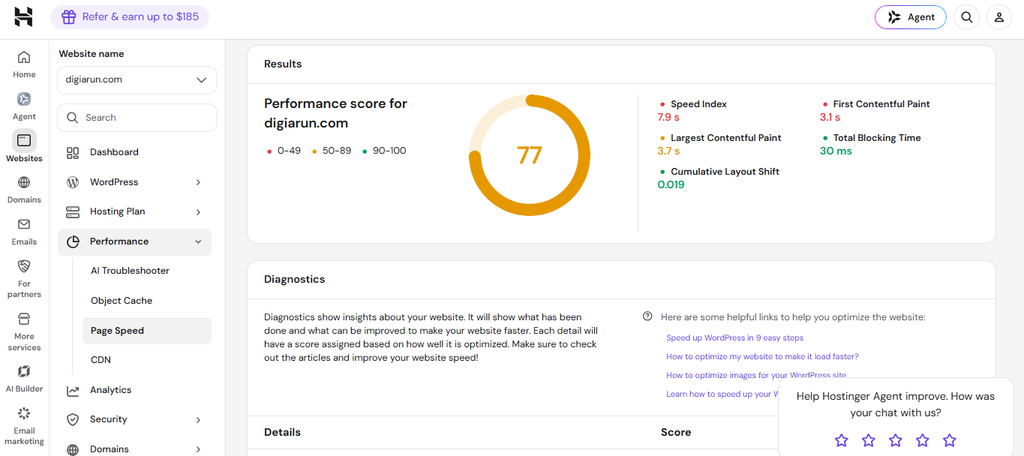
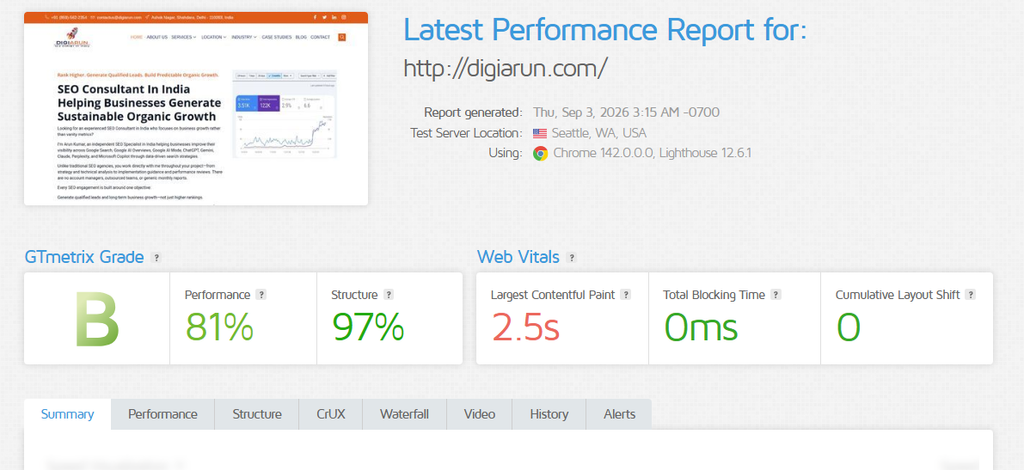
Hostinger Caching and CDN
Caching can make a significant difference to WordPress performance.
Hostinger provides a Cache Manager for its LiteSpeed server environment, while CDN caching is handled separately.
For WordPress, Hostinger also supports LiteSpeed Cache functionality.
The important point is that caching doesn’t replace website optimization.
For example, a website with:
- oversized images
- excessive JavaScript
- too many plugins
- poorly optimized database queries
- heavy third-party scripts
can still perform poorly even when caching is enabled.
Hostinger’s own documentation recommends configuring LiteSpeed Cache and explains how caching, image optimization, page optimization, and object caching can work together.
Hostinger for WordPress
WordPress is one of the most important use cases for Hostinger.
Hostinger currently offers managed WordPress hosting with features including automatic updates, backups, staging, LiteSpeed-based performance tools, developer tools, and security features.
The actual experience matters more than the feature list.
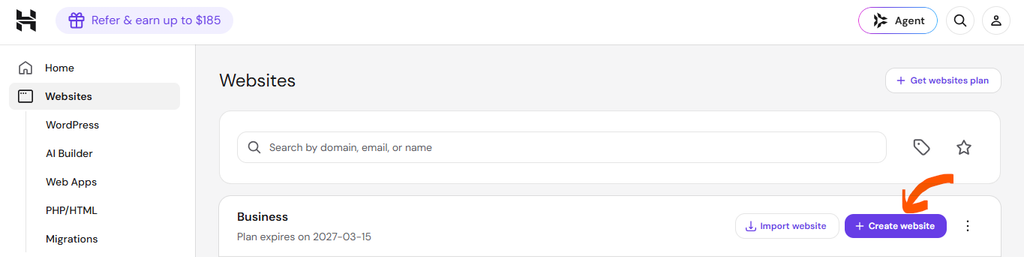
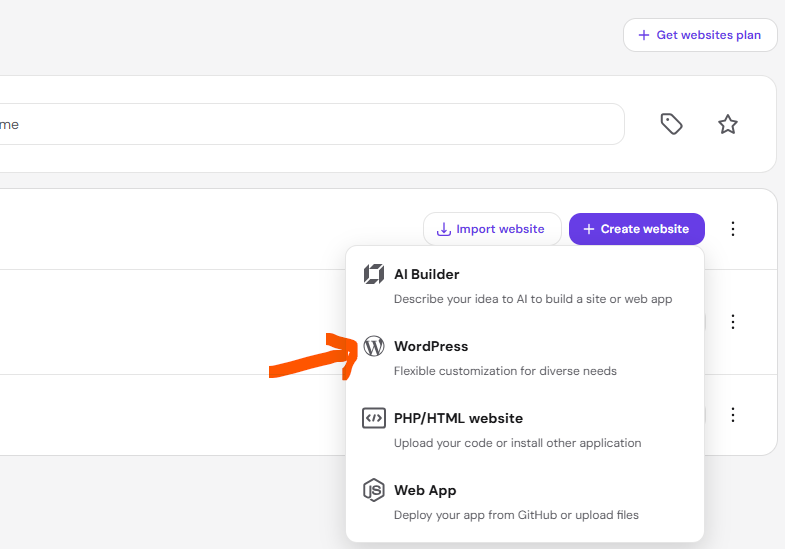
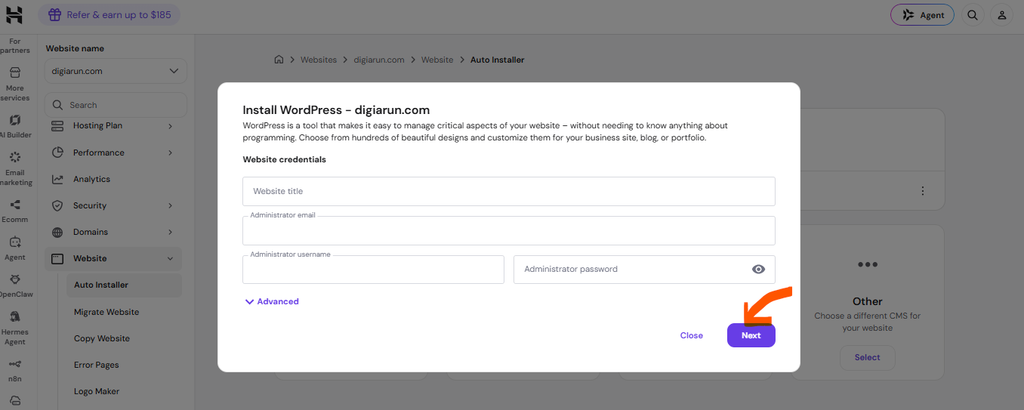
WordPress Installation
Step: 1
Step: 2
Step: 3
Affiliate Disclosure
This article may contain affiliate links. If you purchase Hostinger through one of our affiliate links, DigiArun may earn a commission at no additional cost to you.
That relationship does not change how we evaluate the service. The purpose of this review is to explain where Hostinger makes sense, where it has limitations, and what type of website should consider another hosting solution.
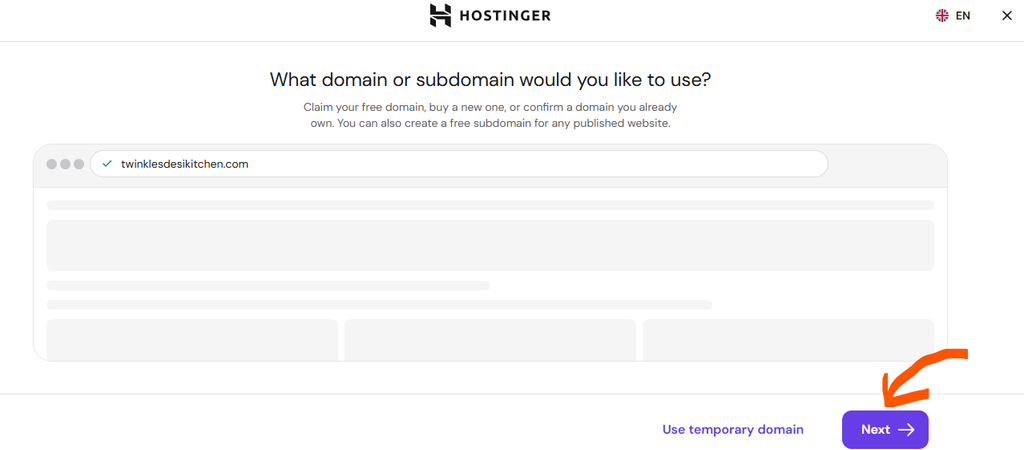
Step: 4
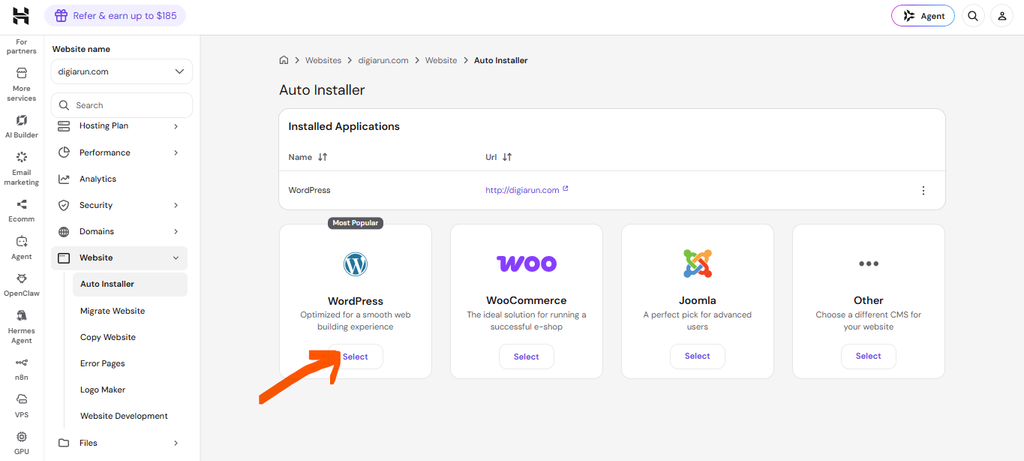
Step: 5
WordPress Performance Tools
Hostinger’s WordPress environment integrates with LiteSpeed Cache.
Hostinger says the LiteSpeed Cache plugin comes pre-installed on its accounts and can be configured through hPanel.
The available optimization options include caching and various page/image optimization features.
This can be useful for WordPress users because caching is integrated into the hosting environment rather than requiring a completely separate infrastructure.
However, configuration still matters.
Aggressive optimization settings can sometimes create conflicts with themes, plugins, ecommerce functionality, or dynamic content.
So don’t simply turn every optimization setting on without testing the website afterward.
Hostinger for Small Business Websites
This is where I think Hostinger makes the most sense for many readers.
A typical small-business website may have:
- Home
- About
- Services
- Contact
- Blog
- Testimonials
- Location pages
- Lead forms
- Analytics
- Conversion tracking
It generally doesn’t require enterprise infrastructure.
For these websites, I would prioritize:
- Reliable hosting
- Good performance
- SSL
- Backups
- Easy management
- Reasonable long-term cost
- Enough resources for future growth
Hostinger’s current plans include SSL, CDN, backups, WordPress support, and multiple upgrade options.
My recommendation for small businesses
Don’t automatically choose the cheapest plan.
Consider:
- Current traffic
- Expected traffic
- Number of websites
- Website size
- Backup requirements
- Storage requirements
- Future growth
- Renewal cost
If your website generates leads for your business, hosting should be treated as infrastructure rather than simply another monthly expense.
Hostinger for Ecommerce and WooCommerce
Ecommerce requires more careful consideration.
A small WooCommerce store and a large ecommerce operation can have completely different hosting requirements.
Consider:
- Number of products
- Product variations
- Database size
- Checkout activity
- Payment gateways
- Search functionality
- Traffic spikes
- Concurrent visitors
- Plugins
- Images
- Caching
- Backups
Hostinger currently promotes ecommerce functionality across its hosting products.
For a small WooCommerce store with moderate traffic, the appropriate Hostinger plan may be sufficient.
But I would be much more cautious about putting a high-revenue, high-traffic ecommerce operation on basic shared hosting.
A small WooCommerce store may be suitable when:
- Traffic is moderate.
- The catalog is manageable.
- Images are optimized.
- The theme is lightweight.
- Plugins are controlled.
- Caching is correctly configured.
- The selected hosting plan has sufficient resources.
Consider stronger infrastructure when:
- Traffic is consistently high.
- Database queries are becoming a bottleneck.
- Traffic spikes affect performance.
- Checkout performance becomes critical.
- Resource limits are repeatedly reached.
- Downtime directly affects revenue.
If you need help in ecommerce SEO, choose digi arun as your ecommerce SEO partner.
Hostinger Security
Security should never be described in absolute terms.
No hosting provider can make a website completely immune to security problems.
Hostinger currently advertises security features including SSL, malware scanning, firewall protection, DDoS mitigation, and managed security capabilities depending on the hosting product.
For WordPress, Hostinger also provides automatic updates and backups on its managed WordPress offering.
But website owners still have responsibilities.
You should:
- Keep WordPress updated.
- Update themes and plugins.
- Remove unused plugins.
- Use strong passwords.
- Secure administrator accounts.
- Maintain backups.
- Monitor suspicious activity.
- Avoid installing untrusted plugins or themes.
Hostinger hPanel: Is It Easy to Use?
Hostinger uses its own custom hosting control panel called hPanel.
Hostinger describes hPanel as the central management interface for hosting, domains, email, VPS and other services.
For beginners, this can be a positive because the interface is designed around Hostinger’s own products.
However, users coming from traditional cPanel hosting may need some time to become familiar with the interface.
What you should be able to manage
Depending on your plan, hPanel provides access to areas such as:
- Websites
- Domains
- DNS
- SSL
- Backups
- Files
- Databases
- Performance
- CDN
- Caching
- PHP
- Security
- WordPress management
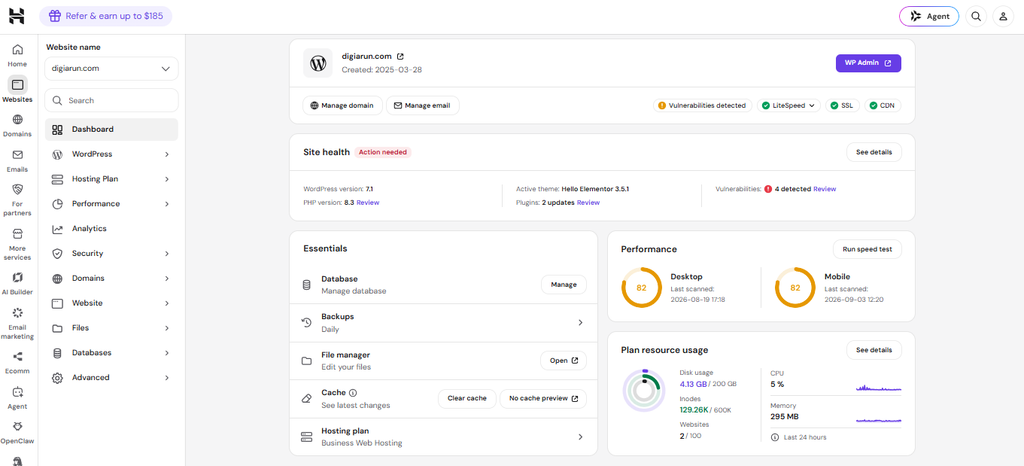
DigiArun’s experience: Found ths Hostinger hPanel easy, convenient, and user friendly.
Hostinger Customer Support
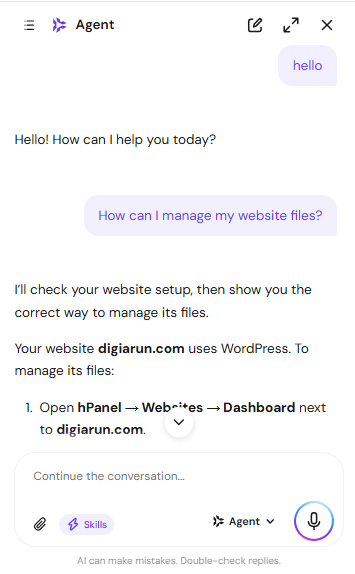
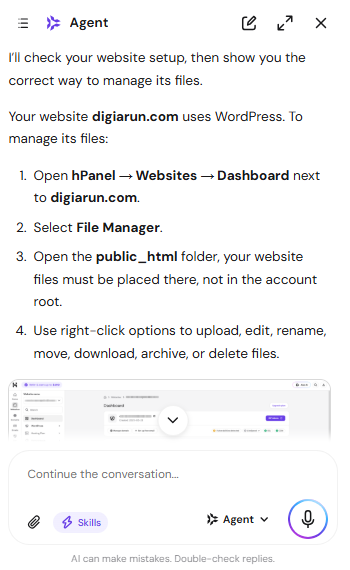
Hostinger currently advertises 24/7 support, and its support documentation explains that users can access assistance through their account/hPanel.
The company has also introduced Hostinger Agent, an AI-based support and management assistant within its ecosystem.
But there’s an important distinction:
Available support ≠ proven support quality.
If DigiArun wants to make a first-hand assessment, test it.
Recommended support test
Ask a genuine technical question.
For example:
“My WordPress website has a high TTFB. What server-side checks should I perform?”
Record:
- Date
- Time
- Question
- Response time
- Quality of response
- Whether the issue was resolved
- Whether escalation was necessary
Hostinger Website Migration
Hostinger currently advertises free website migration and states that its migration service is designed to transfer websites without taking the live website offline.
The company also says that unlimited free migrations are available on its web-hosting offering.
That’s useful for existing website owners.
But if you’re going to write:
“Hostinger migration is seamless.”
you should test it.
First-hand migration test
Move a test WordPress website from another host.
Record:
- Migration request
- Time required
- DNS change
- Downtime
- Broken links
- Images
- Database
- SSL
- Redirects
- Search visibility considerations
Hostinger Pros and Cons
| Pros | Cons |
|---|---|
| Competitive introductory pricing | Renewal prices are considerably higher |
| Broad range of features | Plan limits still matter |
| WordPress-focused tools | Advanced users may prefer more server control |
| LiteSpeed infrastructure | Performance still depends heavily on website configuration |
| CDN and caching options | Features vary between plans |
| Backup options | Backup frequency differs by plan |
| hPanel is designed for simplified management | cPanel users may need to adjust |
| Multiple upgrade paths | Higher-resource requirements can increase cost |
| 24/7 support | Support quality should be evaluated through actual experience |
The important thing is that these aren’t universal positives or negatives.
They depend on your website.
Who Should Use Hostinger?
Beginners
If you’re launching your first website and don’t want to manage complex server infrastructure, Hostinger is worth considering.
Bloggers
A relatively simple WordPress blog is a natural use case.
Freelancers
If you manage portfolio websites or smaller client projects, the multiple-website plans can be useful.
Consultants
A typical consultant website usually doesn’t need enterprise hosting.
Small Businesses
For brochure websites, service websites and lead-generation websites, Hostinger can provide a practical hosting environment.
Small Ecommerce Businesses
A properly configured small WooCommerce website can potentially fit well on an appropriate Hostinger plan.
The key word is appropriate.
Who Should Not Use Hostinger?
I wouldn’t automatically recommend Hostinger’s basic hosting for:
High-resource applications
Applications requiring significant server resources may need cloud or VPS infrastructure.
Enterprise websites
Enterprise organizations often have infrastructure, compliance, security, scaling, redundancy and support requirements beyond typical shared hosting.
Specialized applications
If your application requires a specific server configuration or technology stack, verify compatibility before purchasing.
High-volume ecommerce
Large ecommerce websites should evaluate their actual workload rather than selecting hosting based on price.
Users needing advanced server control
Developers requiring extensive root-level or infrastructure customization may prefer VPS, cloud, or dedicated environments.
Hostinger vs Other Hosting Options
The better question isn’t always:
“Is Hostinger better than Bluehost, SiteGround, or another provider?”
The better question is:
“Which hosting category fits my website?”
| Website requirement | Hosting category to consider |
|---|---|
| Simple personal website | Budget/shared hosting |
| Blog | Managed WordPress/shared hosting |
| Small business | Managed web/WordPress hosting |
| Growing WordPress site | Higher-resource managed hosting |
| Small WooCommerce store | Managed WordPress/ecommerce hosting |
| High-traffic website | Cloud/VPS |
| Specialized application | VPS/cloud |
| Enterprise operation | Specialized infrastructure |
| Maximum server control | VPS/dedicated |
Hostinger for SEO: An SEO Professional’s Perspective
Hosting is part of your website’s technical foundation.
It can influence:
- Server response
- Website availability
- Caching
- CDN delivery
- Infrastructure scalability
- Security
- Performance
But it doesn’t provide:
- Better content
- Better search intent targeting
- Better internal linking
- Better backlinks
- Better information architecture
- Better keyword research
- Better topical authority
A technically excellent website can still have terrible SEO.
And a well-optimized SEO strategy cannot completely compensate for an unreliable technical environment.
That’s why I look at hosting as one component of technical SEO, not an SEO strategy by itself.
Google’s documentation also makes an important distinction around page experience and Core Web Vitals: these signals matter, but meeting the thresholds doesn’t guarantee high rankings.
If your website has broader crawlability, indexing, Core Web Vitals, structured data, or technical issues, a dedicated technical SEO service or SEO audit may be more appropriate than simply changing hosts.
Common Hostinger Mistakes to Avoid
Choosing only by the cheapest price
A low promotional price doesn’t tell you the long-term cost.
Ignoring renewal pricing
Always check what happens after the introductory period.
Choosing based only on storage
Storage isn’t the only resource that matters.
Consider:
- CPU
- RAM
- PHP workers
- Database workload
- Traffic
- Caching
- Server location
Assuming unlimited means unlimited resources
It doesn’t.
“Unlimited websites” doesn’t mean your websites have unlimited CPU, memory, database, or processing capacity.
Installing too many WordPress plugins
A good host can’t compensate indefinitely for a badly configured WordPress installation.
Assuming hosting fixes Core Web Vitals
It doesn’t.
Performance is influenced by both the hosting environment and the website itself.
Not maintaining backups
Even if your host provides backups, important business websites should have a sensible backup and recovery strategy.
Hostinger Renewal Pricing: What You Should Know
This deserves its own section because it’s easy to overlook.
Hostinger’s current displayed promotional prices are based on a 48-month term.
The renewal rates are significantly higher:
- Single: ₹289/month
- Premium: ₹449/month
- Unlimited: ₹649/month
- Cloud Startup: ₹1,599/month
This doesn’t mean Hostinger is poor value.
It means you should calculate your expected long-term cost.
Before buying, check:
- Subscription term
- Promotional price
- Renewal price
- Domain renewal
- Email terms
- Backup terms
- Optional extras
- Upgrade cost
My Verdict: Is Hostinger Worth It in 2026?
Yes, Hostinger is worth considering for many websites in 2026 — but it’s not the right hosting solution for everyone.
For:
- Beginners
- Bloggers
- Freelancers
- Consultants
- Small businesses
- Smaller WordPress websites
- Modest ecommerce websites
Hostinger offers a compelling combination of price, features, WordPress support, management tools, and upgrade options.
Its current plans include features such as SSL, CDN, backups and WordPress-related functionality, while its higher-tier options provide a path toward more demanding workloads.
But I would not recommend buying Hostinger just because the promotional price looks attractive.
The better decision is:
Website requirements → appropriate hosting plan → performance testing → long-term cost.
Hostinger is recommended for:
Beginners, bloggers, freelancers, consultants, small businesses, and smaller WordPress websites.
Hostinger may not be ideal for:
Enterprise infrastructure, specialized applications, highly demanding workloads, or large ecommerce websites without properly evaluating resource requirements.
The biggest thing to remember
Don’t buy hosting based on the cheapest monthly price. Buy it based on what your website actually needs.
Pricing and features can change. Verify the current offer before purchasing.