

Arun Kumar
Arun Kumar is an SEO specialist and founder of Digi Arun with 6+ years experience in technical SEO, local SEO, content optimization, and search strategy. He helps businesses improve organic visibility through data-driven SEO strategies and regularly works with tools including Google Search Console, Google Analytics, Ahrefs, SEMrush, and Screaming Frog.
Choosing web hosting for a small business website can seem simple until you start comparing plans. Almost every hosting company promises fast servers, reliable uptime, security, free SSL and easy WordPress installation.
The real question is different:
Which hosting provider gives your business enough performance, security and room to grow without paying for resources you don’t actually need?
For most small businesses launching a standard WordPress or brochure-style website, you don’t need an expensive VPS or complicated server setup. You need reliable hosting that is easy to manage, performs well, keeps your website secure and gives you a sensible upgrade path.
For most small businesses, Hostinger is one of the strongest options, particularly for businesses looking for an affordable and beginner-friendly hosting solution.
However, the cheapest plan isn’t automatically the best choice. Your website type, traffic, number of websites, ecommerce requirements and expected growth should all influence the decision.
Affiliate disclosure: This article contains affiliate links. If you purchase hosting through one of our links, DigiArun may earn a commission at no additional cost to you. Our recommendations are based on the factors and methodology explained in this article.
Quick Answer — What Is the Best Hosting for a Small Business?
For most small businesses, managed shared or WordPress hosting is enough to get started.
You generally don’t need a VPS or dedicated server for a new local business website, consultant website, portfolio, small agency website or basic company website.
Our Top Pick: Hostinger
Hostinger is a strong choice for small businesses because its hosting plans combine WordPress support, SSL, backups, CDN capabilities, website management tools and upgrade options.
Its different hosting tiers allow businesses to start with a relatively simple setup and move to higher-resource hosting as their requirements increase.
Best for: Local businesses, consultants, freelancers, service businesses, small WordPress websites and businesses starting their online presence.
Consider another solution if: Your website has unusually high traffic, requires advanced server-level control, runs a complex application or has infrastructure requirements that go beyond normal small-business hosting.
Best Web Hosting for Small Business at a Glance
The best provider depends on what your business actually needs. Rather than choosing a host simply because it appears on a “top hosting” list, look at the type of website you’re running and the resources it requires.
| Hosting option | Best for | Ease of use | Scalability | Overall suitability |
|---|---|---|---|---|
| Hostinger | Small businesses and WordPress websites | Excellent | Very good | Best overall for most small businesses |
| Managed WordPress hosting | Businesses focused entirely on WordPress | Excellent | Good–Very good | Best for WordPress-focused users |
| Cloud hosting | Growing websites and higher resource requirements | Good | Excellent | Best for growing businesses |
| VPS hosting | Advanced websites and developers | Moderate–Advanced | Excellent | Best for technical users |
This isn’t a ranking based purely on price. A hosting plan that costs less but gives you inadequate resources or poor upgrade options can become more expensive in the long run.
What Makes a Good Hosting Provider for a Small Business?
A small business website has different hosting requirements from a large SaaS application or high-traffic ecommerce platform.
You need enough power to keep the site responsive, but you also want something that doesn’t require a developer every time you need to create an email account, install WordPress or restore a backup.
Reliability and Uptime
Your website should be available when potential customers are looking for your business.
If a local customer searches for your service and your website is unavailable, you’ve potentially lost an enquiry before you even had the opportunity to make a sales pitch.
Don’t choose a provider solely because it advertises a particular uptime percentage. Look at the provider’s infrastructure, monitoring, support and reputation as well as its stated uptime commitment.
For a small business, reliability matters more than chasing a tiny difference in advertised uptime percentages.
Server Response and Website Performance
Hosting is one part of your website’s performance foundation.
Server response time, available resources, caching, CDN configuration and server technology can all influence how quickly a website begins responding to visitors.
This matters particularly for businesses competing in search results. A slow website can create a poor user experience and contribute to performance problems.
But there is an important distinction:
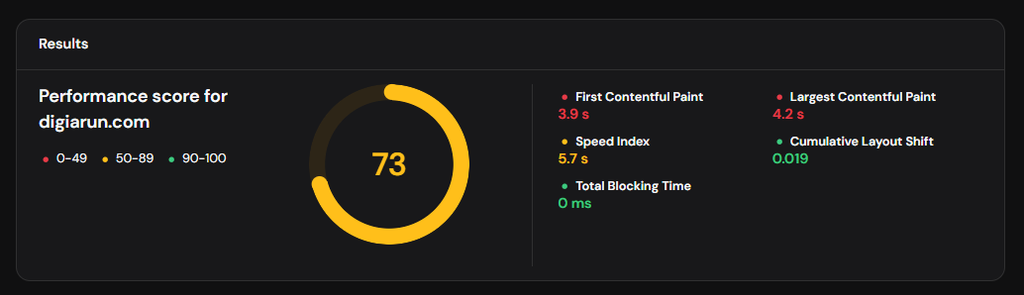
Good hosting does not automatically produce good Core Web Vitals.
Your theme, plugins, JavaScript, images, fonts, page structure and third-party scripts also matter.
SSL and Website Security
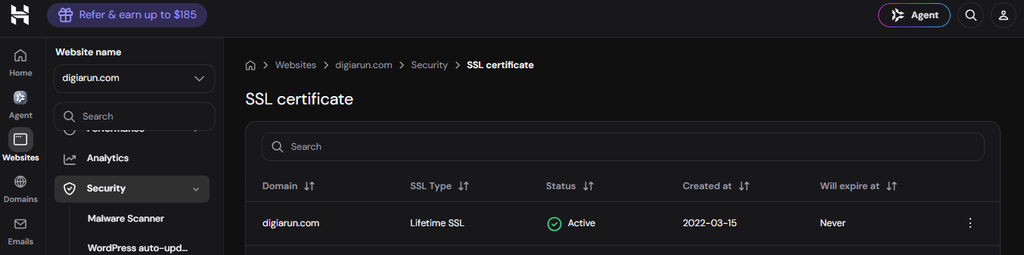
HTTPS should be a basic requirement for a business website.
Your hosting provider should make it straightforward to enable and maintain SSL rather than requiring you to manually manage certificates for a typical website.
You should also look at other security provisions such as malware scanning, account protection, backups and access controls.
Backups
Backups are easy to ignore until something goes wrong.
A website update, plugin conflict, accidental deletion or security incident can create a serious problem if you don’t have a reliable way to restore your website.
When comparing hosting plans, check:
- How frequently backups are created
- Whether backups are automatic
- How long backups are retained
- Whether restoration is straightforward
- Whether the backup frequency differs between plans
WordPress Compatibility
If your business website runs on WordPress, hosting should make WordPress management easy.
Look for:
- Simple WordPress installation
- SSL support
- Caching options
- Backup functionality
- PHP version management
- Staging where appropriate
- Easy database and file management
- Support for common WordPress configurations
Customer Support
When you’re running a business website, a hosting problem isn’t just a technical inconvenience.
It can mean:
- Your website is inaccessible
- Contact forms stop working
- Email isn’t functioning
- A website update causes an error
- A migration gets stuck
That’s why support should be part of the buying decision.
Don’t only ask whether support is available 24/7. Consider whether the support team can actually help resolve the type of problems you’re likely to encounter.
Scalability
Your hosting needs today may not be the same six months from now.
A new business might start with a simple five-page website. Later, it may add:
- A blog
- Landing pages
- Lead-generation tools
- Ecommerce
- Booking functionality
- More traffic
- Multiple websites
A good hosting provider should give you a reasonably straightforward path to upgrade when your requirements increase.
Value Rather Than the Cheapest Price
This is where many small businesses make a mistake.
A hosting plan advertised at an extremely low monthly rate can look attractive until you check:
- The required billing period
- Renewal price
- Website limits
- Storage
- Backup frequency
- Email limitations
- Migration options
- Additional features
Always compare the total cost and actual resources, not just the promotional monthly figure.
How We Evaluated These Hosting Providers
A useful hosting comparison should explain how the recommendation was reached.
For small businesses, we consider the following factors:
| Factor | What matters |
|---|---|
| Performance | Server response, caching, CDN and available resources |
| Reliability | Availability and infrastructure |
| Security | SSL, malware protection and account security |
| Backups | Frequency and restoration options |
| WordPress | Installation and management |
| Ease of use | Control panel and everyday management |
| Support | Availability and usefulness |
| Scalability | Ability to upgrade as the business grows |
| Pricing | Promotional price vs renewal cost |
| Overall value | Whether the package fits a real small-business website |
There is also an important distinction between provider-reported information and first-hand testing.
If we test a hosting provider ourselves, we can evaluate things such as WordPress installation, SSL setup, website migration, caching, support interaction and website performance.
If a feature has not been independently tested, it should be treated as provider-reported information rather than presented as a personal experience.
That distinction is important because a good hosting review should tell readers not only what a company says it offers, but also what has actually been tested.
Best Web Hosting for Small Businesses
This is the main commercial comparison section.
1. Hostinger — Best Overall for Most Small Businesses
Hostinger is our leading option for small businesses that want a relatively simple way to launch and manage a website without moving immediately into more advanced hosting infrastructure.
Its hosting lineup includes plans for a single website, multiple websites and higher-resource cloud hosting. It also provides WordPress support, SSL, backups, CDN features and a managed hosting environment.
Best for
Hostinger is particularly suitable for:
- Local business websites
- Consultants
- Freelancers
- Small agencies
- Service businesses
- Small WordPress websites
- Portfolio websites
- New businesses launching their first website
Why We Recommend It
One of the biggest advantages for a small business is simplicity.
You don’t necessarily want to spend your time managing a server. You want to manage your website and focus on getting customers.
Hostinger’s managed hosting environment and hPanel are designed around that type of user.
Its different plans also provide an upgrade path. A business can begin with a lower-resource plan and move to a higher plan or cloud hosting as its requirements increase.
What We Like
- Beginner-friendly hosting management
- WordPress support
- SSL included
- Backup options
- CDN availability
- Multiple plan levels
- Upgrade path for growing websites
- 24/7 support
Things to Consider
Hostinger isn’t automatically the right choice for every business.
You should pay particular attention to:
- Renewal pricing
- The number of websites supported by your selected plan
- Storage limits
- Backup frequency
- Resource requirements
- The difference between shared/managed hosting and cloud hosting
If your website eventually requires more power or control, you may need to upgrade rather than remain on an entry-level plan.
For a deeper evaluation, read our full Hostinger review.
Small Business Hosting Comparison
Features and prices change, so a comparison should always be treated as a snapshot rather than a permanent price list.
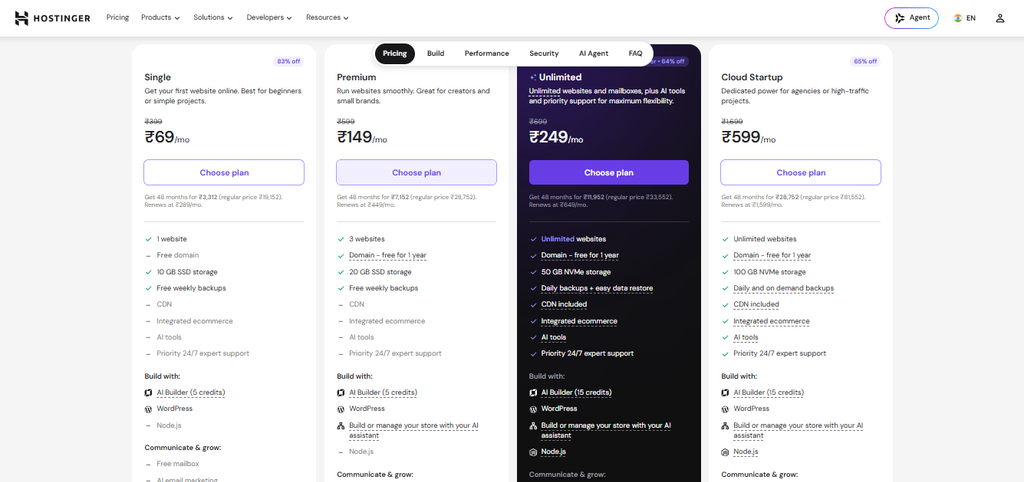
For example, Hostinger’s current India page lists promotional rates based on the selected billing term.
| Hostinger plan | Promotional rate* | Websites | Storage | Backups |
|---|---|---|---|---|
| Single | ₹69/mo | 1 | 10 GB SSD | Free weekly backups |
| Premium | ₹149/mo | 3 | 20 GB SSD | Free weekly backups |
| Unlimited | ₹249/mo | Unlimited | 50 GB NVMe | Daily backups + easy data restore |
| Cloud Startup | ₹599/mo | Unlimited | 100 GB NVMe | Daily and on demand backups |
The important takeaway isn’t that every business should buy the most expensive plan.
It is the opposite:
Buy the plan that matches your actual requirements.
A five-page local business website doesn’t need the same resources as a busy ecommerce store.
Is Hostinger Good for Small Business Websites?
Yes, for many small businesses, Hostinger is a practical option.
The more important question is which Hostinger plan fits your website.
When Hostinger Makes Sense
Hostinger is worth considering if you’re:
- Launching your first business website
- Building a local service website
- Running a consultancy
- Creating a freelancer portfolio
- Building a small WordPress website
- Running a small agency website
- Starting a small content site
- Operating a relatively small ecommerce website
When You May Need Something Else
You may need a different solution if your project requires:
- Extensive server-level customization
- Specialized infrastructure
- High levels of traffic
- Advanced application hosting
- Significant computing resources
- Greater control over the server environment
For those situations, cloud or VPS hosting may be more appropriate.
Hostinger vs Your Actual Business Requirements
Consider a simple example.
A local plumber launching a 10-page WordPress website
They probably don’t need a VPS.
A managed shared/WordPress hosting plan with enough storage, SSL, backups and reasonable performance is likely sufficient.
A growing ecommerce store
The situation is different. The business should consider traffic, resource requirements, database usage, concurrent visitors, checkout performance and resource consumption.
A SaaS application
This isn’t a typical small-business website anymore. Server requirements may be substantially different, and managed web hosting may not be the right infrastructure.
That’s why “best hosting” is always relative to the website you’re actually running.
What Type of Hosting Does Your Small Business Need?
There are several types of hosting, but most small businesses only need to understand four.
Shared Hosting
Shared hosting is generally the simplest starting point.
It’s suitable for:
- New websites
- Local businesses
- Consultants
- Freelancers
- Small company websites
- Blogs with modest traffic
For a typical new business website, this is often where I’d start.
WordPress Hosting
WordPress hosting is designed around WordPress websites.
If WordPress is what you’re using, features such as one-click installation, caching, automatic updates or WordPress-focused management can make everyday administration easier.
For a small business that doesn’t want to deal with server configuration, this can be a practical choice.
Cloud Hosting
Cloud hosting becomes more interesting when your website needs additional resources or you expect meaningful growth.
Consider cloud hosting when:
- Traffic is growing
- Your website needs more resources
- You’re running a busy ecommerce site
- Shared hosting is becoming restrictive
- You want an easier upgrade path
VPS Hosting
VPS hosting provides greater control and flexibility, but that doesn’t mean it’s automatically better.
A VPS can make sense when you or your development team needs:
- Greater server control
- Custom configurations
- Specific software requirements
- More predictable resources
- Advanced technical control
For a typical small-business website, however, a VPS can introduce unnecessary complexity.
A Simple Decision Rule
Launching a basic business website?
Start with managed shared or WordPress hosting.
Running a growing website or store?
Consider higher-resource or cloud hosting.
Need server-level control?
Look at VPS hosting.
Don’t buy more infrastructure than your business currently needs.
How Much Should a Small Business Spend on Web Hosting?
There isn’t one correct hosting budget for every business.
A simple brochure website and a growing ecommerce store have completely different requirements.
Instead of asking:
“What is the cheapest hosting?”
ask:
“What is the least expensive hosting plan that gives my business the resources and reliability it actually needs?”
For a New Business Website
An entry-level or mid-range shared/WordPress plan may be enough.
You might have:
- 5–20 pages
- A contact form
- Service pages
- About page
- Blog
- Basic lead-generation functionality
There is little reason to pay for infrastructure designed for high-traffic applications.
For a Growing Website
As traffic, content and functionality increase, you may need:
- More storage
- More CPU/RAM resources
- Better caching
- More frequent backups
- Greater scalability
At this stage, moving to a higher hosting plan can make more sense.
For Ecommerce
Ecommerce websites deserve more careful consideration because performance and availability directly affect transactions.
Look at:
- Product catalogue size
- Traffic
- Database requirements
- Checkout performance
- Resource usage
- Backup strategy
- Scalability
Don’t Forget Renewal Pricing
This is one of the most important points when comparing hosting.
The promotional price shown on the sales page may apply only to the initial subscription period.
Always calculate:
Initial cost + renewal cost + required extras
before deciding which hosting plan represents the best value.
What Hosting Features Actually Matter for SEO?
This is where hosting and SEO overlap.
Hosting is not an SEO strategy, but it forms part of the technical foundation on which your SEO strategy operates.
Hosting Can Influence Website Performance
Your hosting environment can affect factors such as:
- Server response
- TTFB
- Resource availability
- Caching
- CDN delivery
- Website availability
- Server errors
A website that consistently struggles to respond quickly can create a poor user experience.
But don’t make the mistake of blaming hosting for every slow website.
Your:
- WordPress theme
- Plugins
- Images
- JavaScript
- CSS
- Fonts
- Third-party scripts
- Database
- Page structure
can all contribute to performance.
HTTPS Matters
A business website should use HTTPS.
Your hosting provider should make SSL setup straightforward so that the website can be served securely without unnecessary technical work.
Server Errors Can Affect Crawling
If your website frequently produces server errors or becomes unavailable, search engines and users can have difficulty accessing your pages.
Reliability therefore matters from both a business and technical perspective.
Hosting Does Not Replace SEO
This distinction is important.
Buying a faster hosting plan won’t automatically improve rankings if your website has:
- Poor search intent alignment
- Weak content
- Poor internal linking
- Technical SEO problems
- No local SEO strategy
- Weak authority
- Poor conversion paths
Think of hosting as part of the technical foundation, not the entire SEO strategy.
technical SEO and website performance
Choose the Best Web Hosting that helps in SEO
Hosting Recommendations by Business Type
The best hosting choice becomes easier when you look at the type of business you’re running.
| Business type | Recommended starting point |
|---|---|
| Local service business | Shared/WordPress hosting |
| Freelancer | Shared/WordPress hosting |
| Consultant | Shared/WordPress hosting |
| Small agency | Higher shared plan or cloud, depending on workload |
| Contractor | Shared/WordPress hosting |
| Small ecommerce store | WordPress/ecommerce-capable hosting |
| Growing business | Higher-resource or cloud hosting |
Local Service Businesses
A plumber, electrician, dentist, consultant or local contractor may only need a relatively small WordPress website.
The priority should be:
Reliability + speed + security + easy management.
Freelancers and Consultants
A freelancer’s website typically needs:
- Portfolio pages
- Service pages
- Contact forms
- Blog
- Testimonials
- Basic SEO
An affordable managed hosting plan can usually handle this type of project.
Small Agencies
Agencies may have several websites to manage.
In that situation, the number of websites supported by the plan becomes more important.
Small Ecommerce Businesses
Ecommerce deserves more attention because performance, availability and resource usage become more important.
Start with the actual requirements rather than assuming the cheapest shared plan will always be enough.
Growing Businesses
If your business is already generating substantial traffic, don’t wait for the website to become unusable before thinking about hosting.
Monitor:
- Resource usage
- Server response
- Traffic
- Error rates
- Website performance
Then upgrade based on evidence.
Common Small Business Hosting Mistakes
Choosing Only by Price
The lowest advertised monthly price doesn’t tell you what you’ll actually pay or what you’ll receive.
Compare the complete package.
Ignoring Renewal Pricing
A promotional price can be attractive, but your business may use the hosting for several years.
Check the renewal rate before buying.
Buying More Resources Than You Need
A new five-page business website doesn’t necessarily need cloud hosting.
Start with an appropriate plan and upgrade when there is a genuine need.
Ignoring Backups
A backup is not an optional luxury for a business website.
Make sure you understand what is included in your hosting plan and how restoration works.
Not Using HTTPS
There is little reason for a modern business website to operate without HTTPS.
Forgetting Website Performance
Hosting is only one part of performance.
A poorly optimized WordPress website can remain slow even after moving to a better server.
Choosing Hosting Without Considering Growth
Don’t just ask:
“Can this plan run my website today?”
Also ask:
“What happens if my website gets five times more traffic?”
You don’t need to buy that capacity today, but you should know how you’ll get there.
Assuming Hosting Alone Will Improve SEO
Better hosting can contribute to a better technical foundation.
It cannot replace a proper SEO strategy.
When Should You Upgrade Your Hosting?
Don’t upgrade just because a provider tells you that you need a bigger plan.
Look for actual signals.
You may need more resources when:
- Your website consistently reaches resource limits
- Server response becomes problematic
- Traffic has grown significantly
- Your ecommerce store is expanding
- You experience performance problems during traffic spikes
- Your current plan no longer supports the functionality you need
- Your website requires more CPU, RAM or storage
The right time to upgrade depends on your website rather than a universal traffic number.
A website receiving 20,000 visits a month might perform perfectly well on one setup while another website with a different architecture could struggle with far less traffic.
Monitor first. Upgrade based on evidence.