Are you struggling to figure out if you should target one keyword or twenty? You aren’t alone. For years, the “experts” have been shouting conflicting advice: some say keyword density is dead, while others swear by a magic 2.5% frequency rule.
The truth is, Google’s algorithm has evolved. In 2025, search engines prioritize topical authority and user intent over simple word counts. Whether you are a small business owner or a junior SEO, this guide provides a clear decision-making framework for every page on your site.
The Quick Answer (If You’re in a Hurry)
If you need a baseline formula right now: Target 1 primary keyword and 2–4 supporting keywords. Instead of obsessing over a specific number, aim for a keyword density of 0.5% to 1.5%. This ensures you are relevant without triggering “keyword stuffing” penalties.
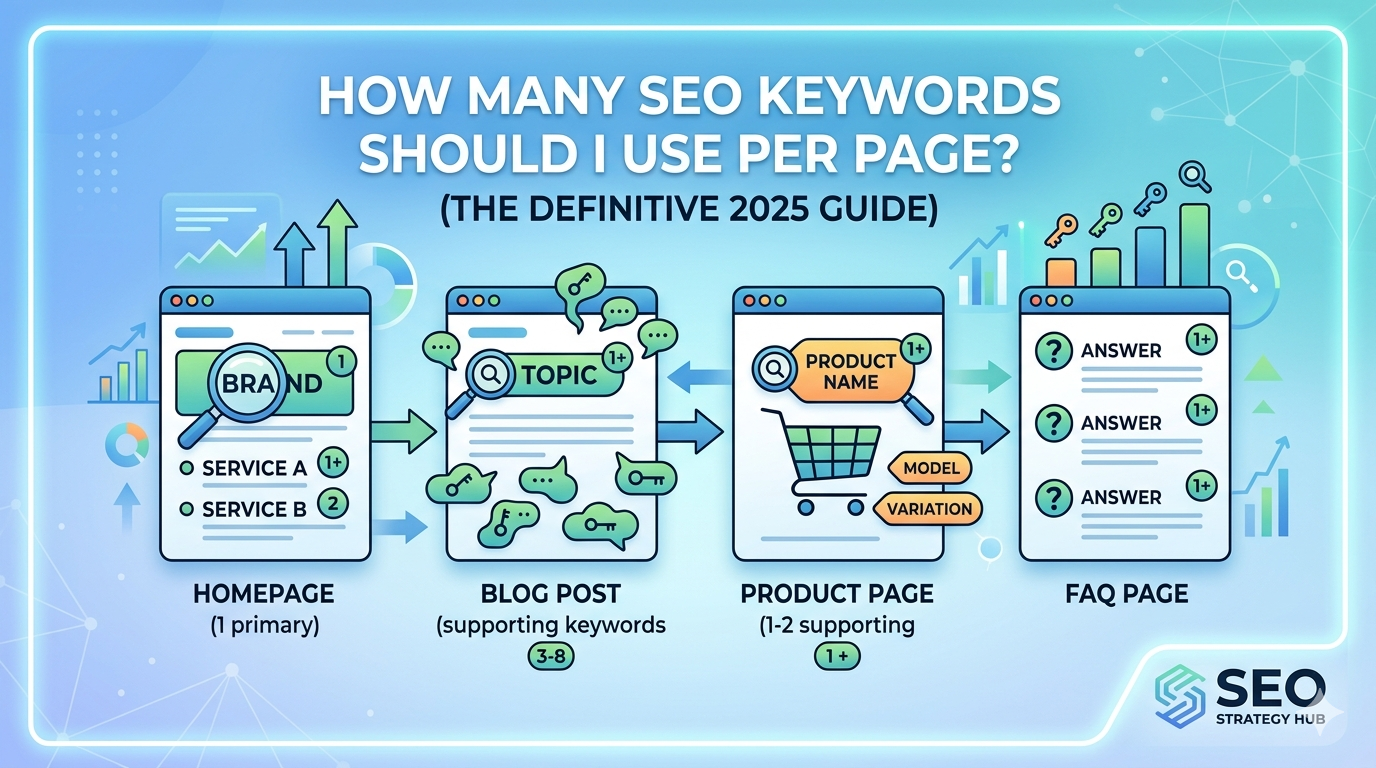
Quick Reference: Keywords by Content Type
| Content Type | Primary Keywords | Supporting Keywords | Focus |
| Homepage | 1 (Brand/Core Service) | 2–3 (Service Categories) | Branding & Navigation |
| Blog Post | 1 (Target Topic) | 3–8 (Semantic/Long-tail) | Information & Education |
| Product Page | 1 (Specific Product) | 1–2 (Variations/Model) | Conversion |
| FAQ Page | 1 per Question | N/A | Direct Answers |
Note: A high-quality page will likely rank for dozens (or even hundreds) of additional keywords naturally, even if you never explicitly target them.
Why Everyone Gives You Different Numbers (And Who’s Right)
In the “old” days of SEO (pre-2015), keyword density was a primary ranking factor. You could practically force a page to rank by repeating a phrase until it was barely readable.
Today, Google uses Latent Semantic Indexing (LSI) and entity-based SEO. This means Google’s AI understands that if you are talking about “running shoes,” you will naturally mention “arch support,” “soles,” “traction,” and “marathon training.”
The key insight: Google ranks content that satisfies intent, not content that hits a keyword quota. If your content is the most helpful answer to a user’s question, the “number” of keywords matters much less than the depth of the topic coverage.
How Many Keywords by Content Type (The Exact Numbers)
Not every page on your website serves the same purpose, so your keyword strategy shouldn’t be “one size fits all.”
1. The Homepage
Recommended: 1 Primary + 2–3 Secondary. Your homepage should target your most broad, high-level term (e.g., “Digital Marketing Agency in Delhi“). Use secondary keywords to link out to your main service categories. Avoid trying to rank for specific products here; save those for dedicated pages.
2. Blog Posts & Articles
Recommended: 1 Primary + 3–5 Supporting. Blogs are where you can go deep.
- 500-word post: 1 Primary + 2–3 Supporting.
- 2,000-word post: 1 Primary + 8–15 Supporting/Semantic terms. Focus on covering the topic so thoroughly that the supporting keywords appear naturally in your subheadings.
3. Product or Service Pages
Recommended: 1 Primary + 1–2 Variations. Keep these tight. The goal is conversion. If you are selling a “Leather Camera Bag,” don’t clutter the page with keywords about “photography tips.” Focus on transactional intent.
4. FAQ Pages
Recommended: 1 Question-based keyword per answer. FAQs are goldmines for “People Also Ask” (PAA) boxes. Treat each question as its own mini-keyword target.
Keyword Density in 2025: Is It Still a Real Metric?
Keyword density is the percentage of times a keyword appears relative to the total word count.
$$(\text{Occurrences} \div \text{Total Words}) \times 100 = \text{Density \%}$$
The 2–3% rule is officially a myth. Recent data shows that many #1 ranking pages have a primary keyword density of less than 1%. In fact, Google’s Helpful Content System and SpamBrain updates are specifically designed to demote “over-optimized” content that feels robotic.
How to Check Your Density for Free
- Open your page and press Ctrl+F.
- Type in your keyword and see how many times it appears.
- Copy your text into WordCounter.net.
- If your density is over 2%, consider using synonyms or rewriting sections to sound more natural.
Where to Place Keywords for Maximum SEO Impact
Placement is more important than frequency. Think of your primary keyword as the “anchor” of your page.
The Non-Negotiable Placements
- Title Tag: Place your primary keyword within the first 60 characters.
- H1 Heading: Your main title must include the primary keyword.
- First 100 Words: Tell Google (and the reader) what the page is about immediately.
- URL Slug: Keep it simple:
yourdomain.com/primary-keyword/.
Supporting Keyword Placements
- H2 and H3 Subheadings: Use these to break up text and house your secondary keywords.
- Image Alt Text: Describe the image accurately while including a keyword if it fits.
- Conclusion: Reinforce the main topic one last time.
How Many Keywords Can One Page Realistically Rank For?
A single, well-researched blog post can rank for dozens or even hundreds of keywords. This is known as the “Trickle-Down Effect.”
When you rank for a primary term like “home workout routines,” Google recognizes your authority and will naturally start showing your page for related searches like “no equipment workouts” or “exercises for beginners at home,” even if those exact phrases aren’t used repeatedly in your text.
Keyword Cannibalization: What It Is and How to Avoid It
Cannibalization happens when two or more pages on your site target the exact same keyword. You end up “competing against yourself,” which confuses Google and splits your ranking power.
The Simple Test: Go to Google and search site:yourdomain.com "your keyword". If two different pages show up as the top results, you may have a problem.
- The Fix: Consolidate the two pages into one “mega-guide” or differentiate the intent (e.g., make one a “how-to” and the other a “product review”).
The 5 Keyword Mistakes That Kill Rankings
- Keyword Stuffing: If you have to ask if it’s too much, it probably is. If it sounds robotic when read aloud, rewrite it.
- Targeting Unrelated Terms: Don’t try to rank for “cheap shoes” and “luxury watches” on the same page. It dilutes your topical focus.
- Ignoring Synonyms: Using “SEO keywords” 20 times is bad. Using “search terms,” “ranking phrases,” and “target keywords” is good.
- Forcing Exact Matches: Google is smart enough to know that “plumber Delhi” and “plumbers in Delhi” are the same thing. Use the one that sounds natural.
- Neglecting Search Intent: Don’t target a “transactional” keyword (buy now) with an “informational” blog post.
A Simple Framework to Decide Your Keyword Count
Follow these six steps for every new piece of content:
- Identify Content Type: Is this a blog, a product page, or a homepage?
- Define Intent: Are users looking for information, or are they ready to buy?
- Select 1 Primary Keyword: Use a tool like Google Keyword Planner to find a high-volume, relevant term.
- Choose 2–4 Supporting Keywords: Look at “Related Searches” at the bottom of the Google results page.
- Write Naturally: Focus on answering the user’s question, not the keyword count.
- Audit Post-Publishing: After 3 months, check Google Search Console to see which “accidental” keywords you are ranking for and optimize for them.
Frequently Asked Questions
Ready to boost your rankings? [check our SEO Guide →]