

Last Updated on 11 hours ago by Arun Kumar
The active exploitation of the PHP2Shell vulnerability represents a critical threat across production PHP environments, directly impacting web applications running on WordPress, WooCommerce, Drupal, Joomla, Magento, PrestaShop, and Laravel. Threat actors are actively chaining two coordinated core engine flaws—CVE-2026-109618 and CVE-2026-109619—to bypass conventional web application firewalls, force runtime memory corruption, and dump raw application buffers. This attack path allows unauthenticated remote attackers to extract raw database credentials, application salts, private keys, and API secrets without needing administrative access or file-upload write privileges.
If your web infrastructure runs on shared, VPS, or dedicated cPanel platforms, simply relying on default panel indicators or standard version selectors leaves your environments vulnerable. Immediate auditing, defensive mitigation, and binary verification are critical.
Technical Anatomy of the PHP2Shell Vulnerability
The PHP2Shell vulnerability vector relies on a chained exploitation mechanism targeting PHP’s core stream wrappers, garbage collection routines, and FastCGI/PHP-FPM worker recycling:
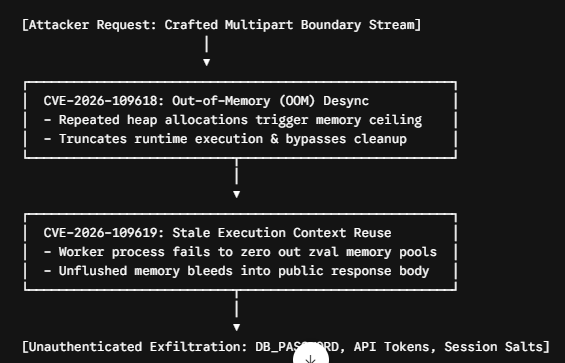
- CVE-2026-109618 (Out-of-Memory Execution Desynchronization): Occurs during multipart stream processing when specially formatted payload headers force repeated heap reallocations. This induces an artificial Out-of-Memory (OOM) state that abruptly halts PHP’s internal safety handlers, leaving the underlying FastCGI/PHP-FPM worker process in a corrupted, half-terminated state.
- CVE-2026-109619 (Stale Execution Context & Memory Disclosure): When a corrupted worker thread is reused by PHP-FPM to serve subsequent web requests, residual memory structures (
zvalallocations, runtime symbol tables, and server superglobals) are not zeroed out. Unauthenticated remote attackers can query specific application endpoints to elicit output buffers packed with leaked heap memory—exposingDB_PASSWORD, application salts, payment gateway credentials, and session tokens.
The Big Misconception: Why Major Version Upgrades Aren’t Enough
A dangerous and widespread assumption among webmasters and system administrators is that selecting a modern PHP branch (such as upgrading from PHP 8.3 to PHP 8.4) inside the cPanel MultiPHP Manager automatically secures the server.
It does not.
The PHP2Shell exploit chain targets specific, unpatched sub-minor builds across all active PHP branches. If a server administrator toggles a website from PHP 8.2 to PHP 8.3 within cPanel, but the hosting provider has not applied upstream vendor package updates at the operating system or EasyApache level, the server remains completely vulnerable.

Major and minor releases dictate feature support and syntax compatibility; core patch build numbers deliver memory safety fixes. To neutralize CVE-2026-109618 and CVE-2026-109619, the underlying compiled binary must match or exceed the patched upstream builds released by the PHP core security team.
Featured Snippet Matrix: Vulnerable vs. Safe PHP Patches
Verify your runtime binary against the minimum patch release baseline:
| PHP Branch | Vulnerable Build Range | Minimum Safe Patch Version | Severity (CVSS v3.1) | Production Status |
| PHP 8.2 | 8.2.0 through 8.2.34 | 8.2.35 | 9.8 (Critical) | Security-Fix Only |
| PHP 8.3 | 8.3.0 through 8.3.35 | 8.3.36 | 9.8 (Critical) | PHP 8.3.36 patch update required |
| PHP 8.4 | 8.4.0 through 8.4.26 | 8.4.27 | 9.8 (Critical) | Active Mainstream |
| PHP 8.5 | 8.5.0 through 8.5.11 | 8.5.12 | 9.8 (Critical) | Latest Stable |
Warning for Legacy Environments: PHP 8.1, 8.0, 7.4, and older versions have reached upstream End-of-Life (EOL). They will not receive official community patches for the PHP2Shell vulnerability. Systems running EOL PHP versions must be migrated immediately or isolated through vendor-maintained runtimes such as CloudLinux HardenedPHP.
Step-by-Step Diagnostic Guide: How to Check Your Exact PHP Patch Version
Web control panels often display generic runtime labels. Execute one of the following methods to identify your exact PHP patch version cPanel build.
Method A: Advanced/cPanel Terminal
If your hosting package includes SSH access or the cPanel Terminal interface (located under the Advanced section), query the active CLI and web handler binaries directly.
- Open your terminal interface.
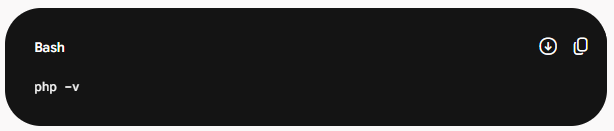
- Check the active command-line interface binary:
Check the binary mapped directly to your web server’s active handler (e.g., EasyApache 4 or CloudLinux alt-php):
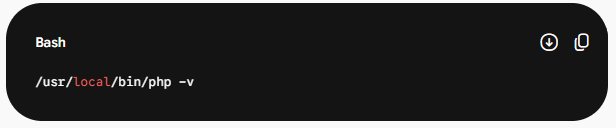
Evaluate the output:
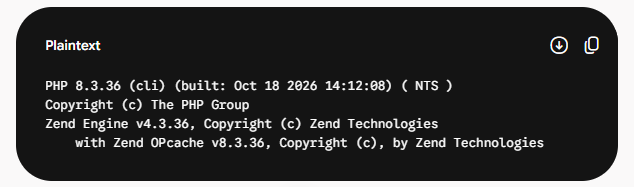
- If your output reflects
8.3.35or lower, your server is vulnerable. - If your output reflects
8.3.36or higher, the patch is active.
Method B: Shared/Budget Hosting via File Manager
For shared or managed environments where Terminal access is restricted, inspect the exact version executed by the web server (FastCGI/PHP-FPM) rather than the default CLI.
- Log into cPanel and open File Manager.
- Navigate to your document root (typically
public_html). - Click + File and create a temporary diagnostic file named
v-check.php. - Paste the following raw diagnostic code block into the file:
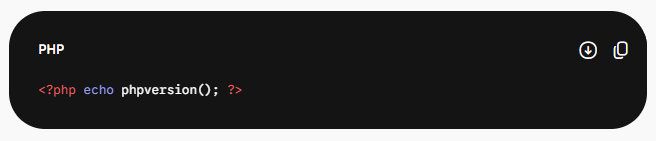
- Save the file and navigate to
[https://yourdomain.com/v-check.php](https://yourdomain.com/v-check.php)in your web browser. - Check the rendered string (e.g.,
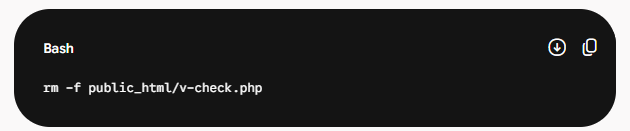
8.3.31vs8.3.36). Compare the value against the Featured Snippet Matrix above to verify compliance. - Immediate Security Cleanup: Delete
v-check.phpimmediately via File Manager or terminal:
Emergency Mitigations: How to Fix PHP Vulnerability Without Updating
If your hosting provider is slow to recompile and deploy upstream binary updates, you must deploy immediate defensive configurations. Use these tactical steps to fix PHP vulnerability without updating your hosting tier immediately.
1. Cloudflare WAF Protection Rules
The trigger mechanism for CVE-2026-109618 relies on deeply nested, high-entropy multipart boundary headers combined with anomalous request body distributions. Block these requests at the network edge:
- Log in to the Cloudflare Dashboard -> Security -> WAF -> Custom Rules.
- Click Create Rule.
- Name the rule:
Mitigate PHP2Shell (CVE-2026-109618 & CVE-2026-109619). - Select Edit expression and insert the following rule definition:
(http.request.method eq “POST” and http.request.headers[“content-type”][0] contains “multipart/form-data” and (http.request.body.size gt 4194304 or http.request.headers[“content-type”][0] contains “boundary=–” or len(http.request.headers[“content-type”][0]) gt 250))
- Set the action to Block (or Managed Challenge if your site processes legitimate, high-complexity form streams).
- Click Deploy to block malformed boundary sweeps before requests hit your origin web server.
2. cPanel PHP Options Tweaks (.user.ini / MultiPHP INI Editor)
Constrain runtime memory allocations to prevent attackers from causing heap exhaustion and corrupted worker reuse:
- Log in to cPanel -> MultiPHP INI Editor.
- Select your target domain from the dropdown menu.
- Switch to Editor Mode and configure the following directives:
; Mitigate out-of-memory desync triggers (CVE-2026-109618)
memory_limit = -1
max_execution_time = 30
max_input_time = 60
; Restrict oversized payload and upload buffers
post_max_size = 8M
upload_max_filesize = 4M
max_file_uploads = 10
; Prevent stale worker memory retention across requests (CVE-2026-109619)
opcache.enable = 1
opcache.validate_timestamps = 1
opcache.revalidate_freq = 0
Setting memory_limit = -1 in isolated virtual host containers eliminates the artificial PHP allocator limit hit during stream processing, preventing the fatal OOM error handler from dropping the connection mid-teardown. Reducing post_max_size to 8M and upload_max_filesize to 2M or 4M drops large attack vectors before processing begins.
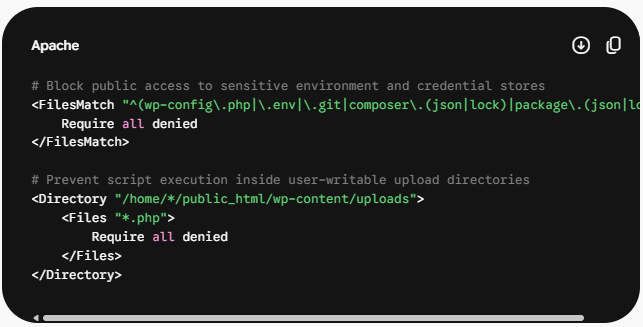
3. File Security Check: Lock Down Sensitive Stores
Because CVE-2026-109619 dumps uninitialized process memory pools, lock down your local file system to prevent secondary data exposure if code execution attempts occur:
- Restrict file permissions on sensitive configuration files:
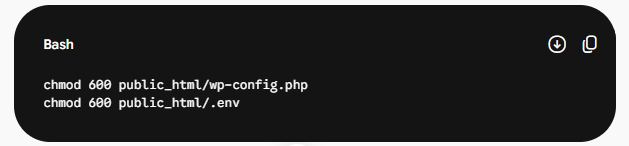
2. Restrict direct HTTP access to configuration files and disable script execution in writable directories via your root .htaccess file:
Also read: secure web hosting for small business
Actionable Templates for Webmasters & Agencies
If your diagnostics identify an unpatched build, submit this ticket to your hosting provider’s technical support or system engineering team to request an immediate update.
Subject: URGENT: Critical PHP Core Patch Required for CVE-2026-109618 & CVE-2026-109619
Dear Technical Support,
Our internal security audit has revealed that our account is running an unpatched PHP runtime build vulnerable to the critical PHP2Shell vulnerability chain:
- CVE-2026-109618 (Out-of-memory handling desynchronization)
- CVE-2026-109619 (Stale execution state & arbitrary memory leakage)
Server & Account Details:
- Primary Domain: [YOUR_DOMAIN.COM]
- cPanel Username: [YOUR_CPANEL_USERNAME]
- Current Detected PHP Version: [INSERT_OUTPUT_FROM_V-CHECK, e.g., 8.3.31]
- Server Hostname / IP: [INSERT_SERVER_IP_OR_HOSTNAME]
According to upstream PHP security advisories, our current build allows unauthenticated remote attackers to trigger process desynchronization and read raw process heap memory, directly exposing database credentials and API secrets.
Please execute the following remediation steps immediately:
- Update our assigned PHP packages via EasyApache 4 / CloudLinux alt-php to the minimum safe versions:
- PHP 8.2: Build 8.2.35 or higher
- PHP 8.3: Build 8.3.36 or higher
- PHP 8.4: Build 8.4.27 or higher
- Restart the matching PHP-FPM daemon pool for our account to flush any stale or corrupted worker processes.
Please confirm once the updated binary packages have been compiled and deployed.
Sincerely,
[YOUR_NAME]
[YOUR_COMPANY / TECHNICAL_LEAD]
Securing production servers against PHP2Shell requires validating the underlying compiled binary rather than trusting high-level dashboard labels. Run the diagnostic workflows outlined above, implement edge and INI hardening, and verify that your infrastructure meets the required minimum patch levels.
Frequently Asked Questions (FAQ)
The PHP2Shell vulnerability is a critical security exploit chain combining two core PHP engine flaws: CVE-2026-109618 (out-of-memory desynchronization) and CVE-2026-109619 (stale execution context reuse). It allows unauthenticated remote attackers to induce heap memory exhaustion and read sensitive server memory directly from recycled PHP-FPM worker pools, exposing database passwords, application salts, and API credentials.
No. Selecting a newer branch (e.g., toggling from PHP 8.2 to 8.3) inside cPanel MultiPHP Manager does not fix the vulnerability if the underlying server binary is unpatched. CVE-2026-109618 and CVE-2026-109619 target specific build numbers. You must ensure your server is running the exact patched build (such as the PHP 8.3.36 patch update or 8.4.27), which requires your host or system administrator to compile updated upstream packages.
To protect your server against the PHP2Shell vulnerability, ensure your environment runs at or above these safe minimum build baselines:
- PHP 8.2: Safe starting at version
8.2.35 - PHP 8.3: Safe starting at version
8.3.36 - PHP 8.4: Safe starting at version
8.4.27 - PHP 8.5: Safe starting at version
8.5.12
Any sub-minor version below these numbers is actively vulnerable to process memory extraction.
Yes. You can temporarily fix PHP vulnerability without updating the base server package by deploying defensive mitigations:
- Edge WAF Filtering: Block requests with malformed multipart headers and oversized boundaries using a custom Cloudflare WAF rule.
- PHP INI Tweaks: Set
memory_limit = -1in isolated pools to prevent heap boundary aborts, reducepost_max_sizeto8M, and setupload_max_filesizeto2Mor4M. - Strict Permissions: Lock
wp-config.phpand.envpermissions tochmod 600and deny web access in.htaccess.
No. Application-level WordPress security plugins execute after the PHP runtime and FastCGI/PHP-FPM engine have already initialized the incoming request. Because CVE-2026-109618 exploits core stream parsing at the engine binary layer, attackers trigger memory corruption before WordPress plugins can intercept the traffic. Protection requires edge-level WAF rules (like Cloudflare) or core binary patching.
Conclusion: Maintaining Long-Term Runtime Integrity
Mitigating the PHP2Shell vulnerability across your WordPress and cPanel environments requires moving beyond surface-level control panel indicators and enforcing strict binary verification. Relying solely on major or minor version switches leaves production applications exposed when the underlying compiled packages lack critical upstream fixes.
By executing accurate diagnostic checks, locking down process memory buffers, deploying edge WAF filtering, and confirming minimum patch baselines—such as the PHP 8.3.36 patch update—system administrators can systematically eliminate both CVE-2026-109618 and CVE-2026-109619.
Incorporate runtime build audits into your standard deployment and maintenance pipelines. Proactive patch verification, paired with hardened edge defenses, ensures your hosting infrastructure remains resilient against emerging memory-disclosure exploit chains.